
Offline open house app can mean two very different things, and the difference only shows up on the day you can't afford to find out. Most sign-in tools that advertise offline support are offline-capable. They're built around a server, and when the signal drops they hold your sign-ins on the tablet and try to sync later. OpenHouse is offline-only. There is no server, no account, and no network call to fail in the first place. Visitor data is written to local storage on your iPhone or iPad the instant someone taps done, and it stays there until you deliberately export it.
That distinction sounds academic until you're standing in a vacant rural listing with one bar of LTE and a buyer's agent walking up the driveway. This page covers how OpenHouse handles open house sign-in without internet, what actually happens to each lead, how an offline open house app of this kind differs from sync-later tools, and what you give up in the trade.
Two kinds of offline open house app
Almost every app in this category will tell you it "works offline." The useful question is how.
Sync-later (offline-capable). The app is a front end for a cloud service. When there's no connection, sign-ins are held on the tablet and uploaded once the signal returns. Open Home Pro, the long-running tablet sign-in app, works this way: its sign-in runs on the tablet and syncs data up to your account afterward. Fine most of the time. But the cloud is still the source of truth, and your offline session is a temporary exception the app has to recover from, with queued records, retry logic, and the occasional lead that never turns up on the dashboard.
Offline-only (local-first). The device is the source of truth, full stop. OpenHouse writes every sign-in directly to a local database on the iPad or iPhone. There is no upload step because there is nowhere to upload to. No backend, no analytics service, no login server. A no-Wi-Fi open house runs the same code path as every other open house, because the app never had a connected mode to fall back from.
| Sync-later apps | OpenHouse (offline-only) | |
|---|---|---|
| Source of truth | Cloud account | Your device |
| Needs signal to start an event | Often (login, listing fetch) | Never |
| Sign-in during dead zone | Queued for upload | Saved, final, done |
| When signal returns | Sync runs (and can fail) | Nothing happens |
| Account required | Yes | No |
| Who can see leads server-side | The vendor | Nobody. There is no server |
Neither model is dishonest, but they fail differently. A sync-later app in a dead zone is borrowing against a future connection. An offline open house app with no backend has nothing to pay back. When a rival markets an "offline mode" that is really capture-then-sync, the distinction is the whole ballgame; we walk through true offline vs capture-then-sync in our head-to-head with Brivity.
Dead zones are normal, not rare
If every listing had fast Wi-Fi, none of this would matter. Think about where open houses actually happen:
- Vacant homes. The sellers moved out and cancelled the internet weeks ago. The "free Wi-Fi" you were counting on is a router in a moving box.
- New construction. Builders rarely light up internet in a spec home, and fresh framing plus foam insulation does cellular signal no favors.
- Rural and acreage listings. One bar of service at the end of the county road on a good day. On this kind of property, "open house app dead zone" stops being a figure of speech. Your phone just says No Service.
- Concrete and steel condos. Downtown units where signal dies in the elevator and never comes back, especially in interior-facing units and basements.
- Busy suburban Sundays. Even with decent coverage, thirty phones in a staged living room can crawl a cell sector to a stop right as your line forms.
These are the listings where an offline open house app earns its keep. Roundups of sign-in tools, like The Close's open house app comparison, treat offline operation as a headline criterion, because every working agent has lost a lead to a spinner. The clipboard never had a loading state. Your sign-in app shouldn't either.
How OpenHouse captures leads with no Wi-Fi
One lead through an offline open house app at a no-signal listing, start to finish:
- You open the event. Nothing loads from a server, because the listing and your question setup already live on the device. No login, either.
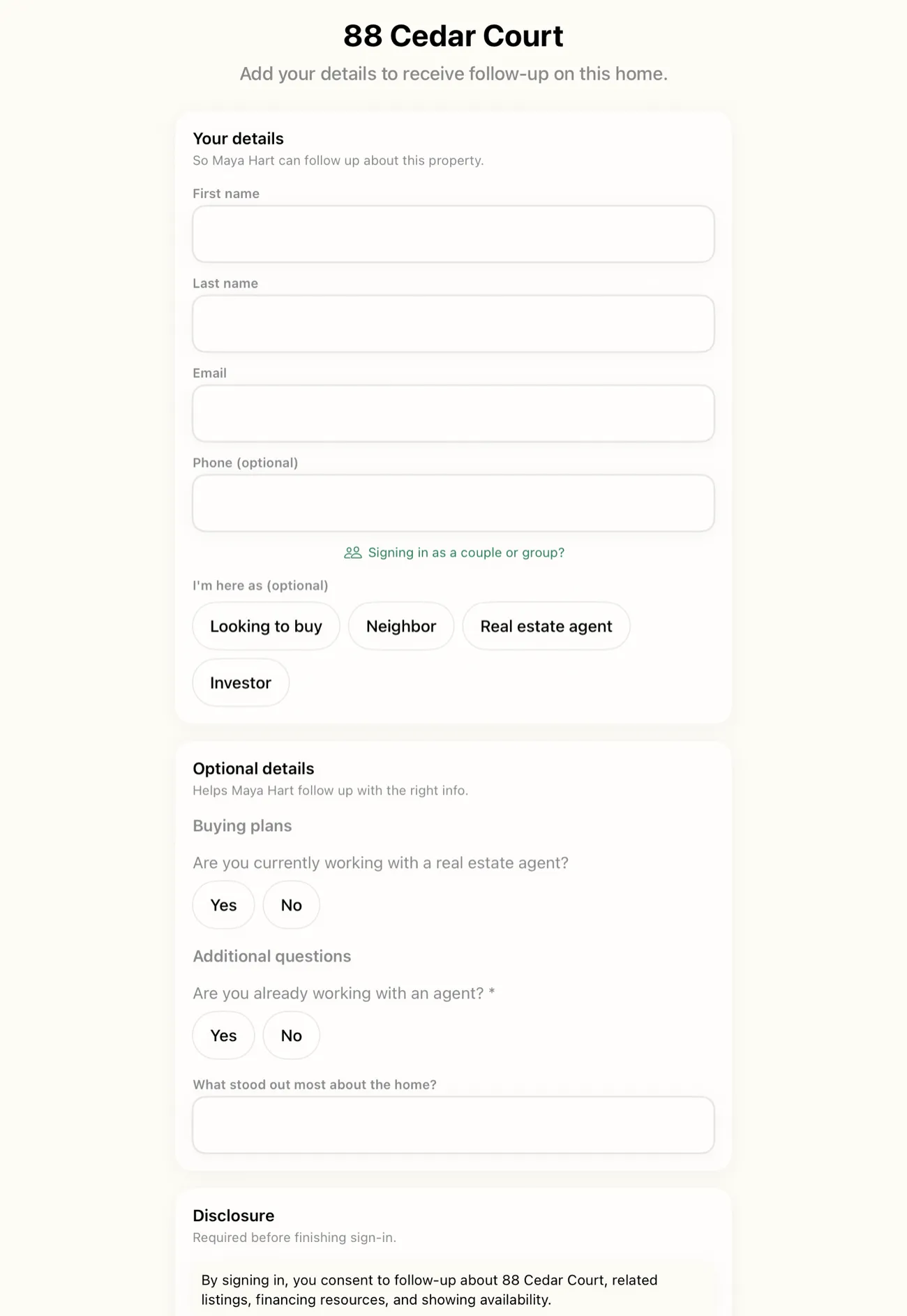
- A visitor signs in. They get a single screen with name, contact info, and your qualifying questions. No web form, no page load, nothing rendered from a URL.
- The lead is committed instantly. The moment they finish, the record is written to the local database on the device. Not cached, not queued. Saved, the way Notes saves a note.
- You review on the spot. Lead list, qualification status, and the running event summary all read from local storage, so triage works in Airplane Mode.
- You export on your terms. Back in coverage, or back at the office, you export your leads when you're back online as CSV, PDF, vCard, straight into Apple Contacts, or shared to your CRM. Export is the only step that can touch a network, and only because you pointed it at one.
Notice what's missing: a sync step. An offline open house app built this way has nothing to do when the signal comes back. Your data was never in transit, so there's nothing to reconcile and nothing to lose.
Crashes, force-quits, and dead batteries
Crash safety falls out of the same design. Each sign-in is committed to disk the instant it's completed, so a crash, a force-quit, or a dead battery only puts at risk the single form that was open on screen at that moment. Reopen the app and every completed sign-in is exactly where it was. There's no pending-uploads purgatory where leads sit half-saved, because an offline open house app has no uploads to leave pending.
If the iPad is lost or stolen
With leads stored on the device, the device matters. No way around that. The data sits inside iOS's standard app sandbox on hardware that's encrypted by default, behind whatever passcode or Face ID you've set, which makes it a good deal harder to rifle through than the paper sheet on the entry table that any visitor could photograph. The practical habit is the one you already have: export after each event, and treat the iPad the way you treat the lockbox.
No signal at the door: the kiosk still runs
Offline lead capture matters most in self-serve mode, when the iPad sits by the front door and you're upstairs with a buyer. OpenHouse lets you run the kiosk with zero signal for the same reason everything else works without one. In an offline open house app, the locked sign-in screen is local software, not a webpage, so there's no kiosk URL to fail to load and no session token to expire halfway through the afternoon.
Pair it with Guided Access (Apple's built-in feature for locking an iPad to a single app, documented in Apple's Guided Access guide) and visitors can't wander out of the form, with or without internet. If you're new to running a tablet at the door, our walkthrough on setting up an iPad kiosk at the listing covers stands, placement, and battery strategy too.
Put any offline open house app through this test first
Don't take an app's word for any of this, including ours. The test takes ninety seconds, and you should run it on whatever sign-in tool you currently use:
- Put the iPad or iPhone in Airplane Mode (Wi-Fi off too).
- Open the app and start a new event.
- Sign in three fake visitors, including one who abandons the form halfway.
- Force-quit the app. Reopen it.
- Check: are all three complete sign-ins present, with their answers intact?
- Still in Airplane Mode, try to view, qualify, and export the leads.
OpenHouse passes every step, including export. A CSV or PDF generated on-device saves to Files with no connection at all; emailing it waits until you have one. If your current app needs a login screen, a listing download, or a sync before any of that works, now you know what it'll do at the dead-zone listing, while it's still a fire drill instead of a lost buyer.
The trade-offs, stated plainly
Offline-only is a deliberate bet, and it costs something. Here is what you accept in exchange for an offline open house app with no account and no vendor between you and your leads:
- There's no cloud dashboard. You can't open a browser at home and see leads from the iPad your assistant ran across town. The leads stay on the device that captured them until they're exported.
- Backup is your job. No backend means no automatic offsite copy. The honest workflow is to export after every event. It takes seconds, and it's the same habit that makes every CRM, mail merge, and follow-up sequence work anyway.
- No multi-device live sync. Two iPads at one mega open house are two lead lists until you export and merge them.
What you get back is durability of a different kind. Server-backed apps live and die with their vendor. Spacio was a category leader until HomeSpotter wound it down and its App Store listing was removed in January 2026, leaving agents scrambling to pull their data off servers on a deadline. An offline open house app with no server can't strand your leads behind one. And if your OpenHouse subscription ever lapses, the app drops to a data-safe read-only mode. Everything you captured stays viewable and exportable, forever.
The boring feature that decides the whole day
Most of what an open house app does (pretty forms, QR codes, follow-up) only matters if the sign-in actually saved. Offline-first is the architecture everything else sits on, from the single-screen form to the seller report. You can see how the rest fits together across every OpenHouse feature.
If your next listing is the vacant one, the new build, or the farmhouse with one flickering bar, try OpenHouse there first. Put it in Airplane Mode at the kitchen counter and watch a sign-in save anyway. That's the whole pitch: the one open house where everything else fails is the one this offline open house app was built for.
Rural listings and the open house app no cell signal problem
In most real estate markets there are listings that simply have no signal, not slow signal, not one bar that flickers, but genuinely no service. Acreage, lake properties, mountain cabins, rural subdivisions on the fringe of carrier maps. Running an open house sign in at one of these means your options are: hope for a miracle, fall back to a paper clipboard, or use a tool that was never dependent on a carrier to begin with.
Rural open house sign in has its own texture. The buyers showing up are often serious, they drove forty-five minutes to get there, and they're not comparison shopping. You cannot afford to lose a contact. But the routing down a county road cut through a cell sector long ago, and the nearest tower is three miles through a tree line. An open house app no cell signal scenario is not a "what if" for rural agents. It's Wednesday afternoon.
OpenHouse was designed with the assumption that the device is the only computer in the room. The app never tries to pull a listing from a server before you can start an event, because listings live in local storage. It never tries to authenticate your account when you wake the iPad, because there is no account. When a rural buyer walks up to the table, taps through the sign-in form, and hits done, their record is committed to an on-device database, the same database that would have received it if you were sitting in a Midtown high-rise with a gigabit fiber connection.
The practical checklist for a rural open house looks like this:
- At home (or the office): Open the app, create or load the event, confirm your questions are set. No steps are signal-dependent.
- On the way out: Charge the iPad or iPhone the night before. Bring a portable battery if it's an all-day event. The app draws nothing from the radio because the radio isn't part of the feature set.
- At the listing: iPad on a table near the door. Kiosk mode on. Done. You can be out walking the acreage with buyers while the tablet captures every visitor who wanders through behind you.
- After the event: Drive back to coverage, or wait until you're home, then export your leads to CSV, PDF, or directly into your CRM. That export step is the only one that touches a network, and only if you're sharing to an outside service.
There is no "upload when signal returns" step because there was never a queue. When signal comes back, OpenHouse does nothing automatically, because nothing was waiting. The leads have been on the device since each visitor finished. Rural open house sign in, solved the dull way: don't need what you don't have.
Vacant homes, construction zones, and basements where Wi-Fi and LTE die
Rural acreage is the obvious case, but plenty of zero-signal moments happen in suburban and urban settings where you'd expect connectivity. The common thread is the absence of an active occupant and the physics of modern construction.
Vacant homes are probably the most common dead-zone scenario for working agents. The sellers left two months ago and took their router, their cable box, and their ISP contract with them. The house looks wired, there are plates on the wall, but the line isn't active. Your iPhone shows two bars of LTE in the driveway and zero the moment you walk to the kitchen. Concrete slab, brick facade, low-E glass windows, and a neighboring cellular sector that points the wrong direction. For a sign-in app that depends on a connection, this vacant listing is a problem waiting to happen.
New construction and construction zones compound the issue. Builders don't provision Wi-Fi in spec homes until a buyer closes. Meanwhile, the same fresh concrete, foam insulation, and metal framing that makes the home energy-efficient also makes it a radio-frequency dead zone. It's common to see agents hold open houses in brand-new construction with no internet and no cell signal from the garage to the top floor. An open house app no wifi dead zone is not a corner case here; it's the baseline condition for every single listing until move-in day.
Basements and lower levels apply to both vacant and occupied homes. The listing might have perfectly good internet on the main floor, but the finished basement where buyers linger, the one with the bar, the media room, the reason half the visitors showed up, sits below grade behind poured concrete walls. LTE doesn't penetrate well, and the home's Wi-Fi might not reach or might be password-protected. The sign-in tablet positioned at the basement entry needs to capture leads no internet, full stop.
In all three cases, OpenHouse behaves identically to how it behaves on a fiber connection: the form appears, the buyer fills it in, the lead saves. There is no "you must be connected to continue" prompt because the code path has no such check. The lead isn't held in memory hoping for a signal. It's written to disk the instant the visitor finishes, whether that's in a bright sunny show home with fast Wi-Fi or in a poured-concrete basement two bars below a cell tower's reach.
If you want to pressure-test this yourself before you rely on it at a listing that matters, the airplane mode test further up this page covers exactly that. Run it once in a basement if you have one handy. The result is the same.
Frequently asked questions
Does OpenHouse work with no Wi-Fi at all?
Yes. Sign-in, qualification, lead review, and the event summary all run with zero network access, even in Airplane Mode. The app makes no network calls during the event, so there is no degraded offline mode, offline is the only mode.
What happens when the signal comes back?
Nothing, by design. There is no sync queue and no upload step. Your leads were already complete on the device the moment each visitor signed in, and you export them whenever you choose, CSV, PDF, Contacts, vCard, or a share to your CRM.
Is data lost if the app crashes or the iPad dies?
No. Each sign-in is committed to the device's local database the instant the visitor finishes, so a crash, force-quit, or dead battery only risks the single form that was open on screen at that moment. Every completed sign-in is already on disk.
Do I need an account to use OpenHouse offline?
No account, login, or registration is required. There is no backend to register with, which is exactly why the app keeps working without internet.
Will OpenHouse work at a rural listing with no cell signal at all?
Yes. OpenHouse makes zero network calls during an event, so there is no difference between a listing with fast Wi-Fi and one with no cell signal whatsoever. Every sign-in, every qualifying question, and the full lead list all live on the device.
What about basements and construction sites where signal dies mid-open-house?
Same result. The app does not require a handshake when a visitor starts the form or when they finish. If signal drops the moment a buyer steps to the tablet, the sign-in still saves to local storage the instant they tap done.
Do I need to do anything special to use the app in a rural or no-signal area?
Nothing. There is no offline mode to enable, no cache to warm up before you leave, and no signal check when you open the app. Set up your event questions at home or at the office, drive to the listing, and the iPad runs the same way regardless of what the carrier map shows.