
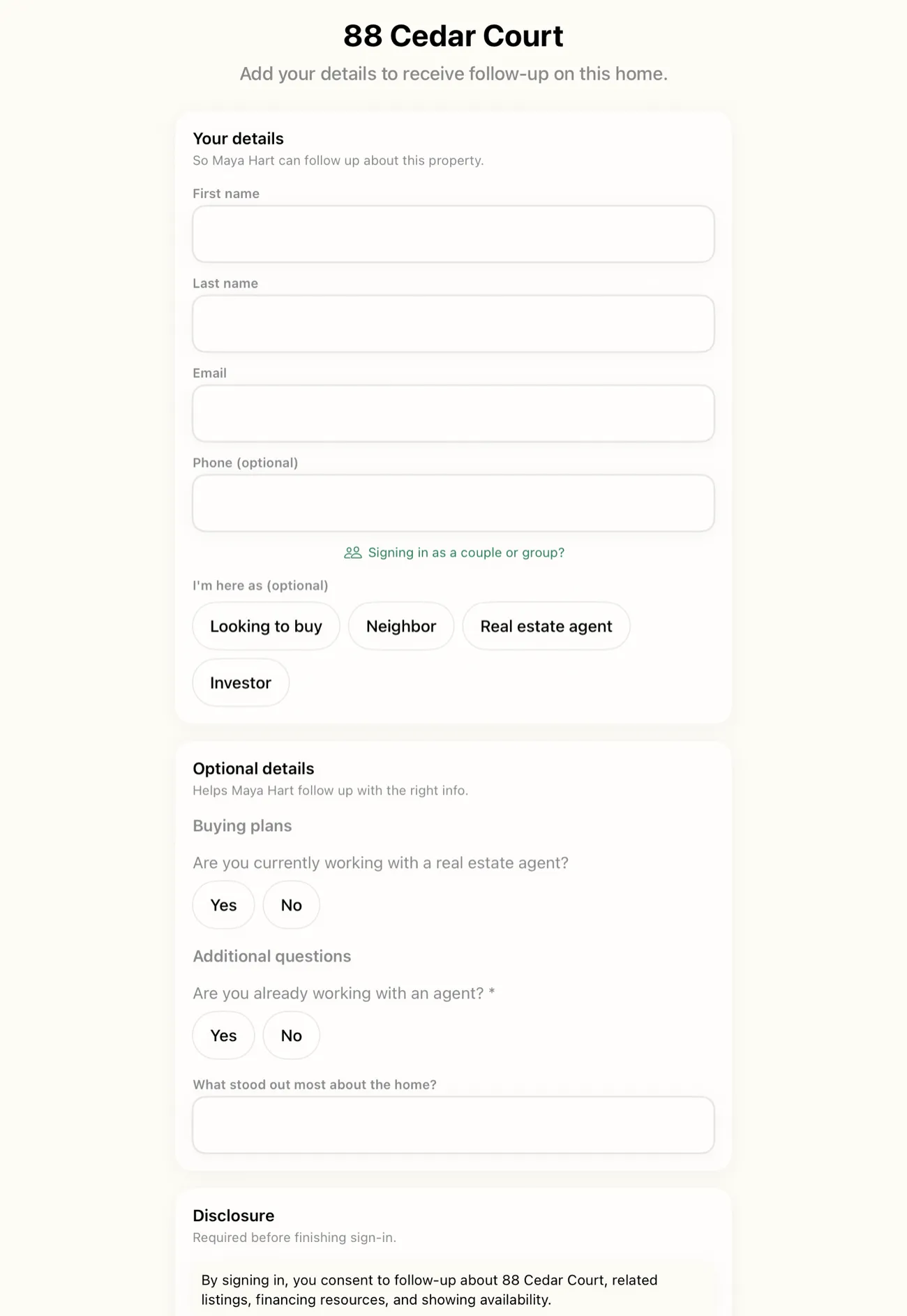
Open house kiosk setups usually mean one of two things: a clipboard with a pen that walks off, or an iPad running a sign-in app that a visitor can back out of with one stray tap. OpenHouse takes a third path. Kiosk mode is built into the app itself. It locks the iPad to the sign-in flow behind a long-press and a PIN, so the device at your front door behaves like a purpose-built sign-in station instead of a tablet somebody left open on a form.
The front door is a first impression. A propped-up clipboard says small operation. A clean open house kiosk says you run a tight event. This page covers what kiosk mode does, how it compares to a DIY Guided Access setup, and why a locked sign-in screen matters more for privacy than most agents realize.
What an open house kiosk actually has to do
Strip away the marketing and the job list is short:
| Job | What that looks like at the door |
|---|---|
| Greet | A welcome screen with the property front and center, not your app chrome |
| Capture | A short, single-screen form a visitor finishes in under a minute |
| Reset | Return to the welcome screen, blank, for the next guest |
| Stay put | No path out of the flow without the agent's deliberate action |
Most tablet setups handle the first two and quietly fail the last two.
The form doesn't reset, so guest number seven sees guest number six's phone number. Or the app is just a normal app, so a bored teenager taps back twice and lands on your dashboard. An open house kiosk earns its keep on those last two jobs.
When you start kiosk mode in OpenHouse, the iPad is dedicated to the visitor loop: welcome, sign-in, thank-you, reset. There is no visible path to your dashboard, your other events, or anyone else's contact info. Leaving the kiosk takes a long-press and a PIN, a deliberate two-step action a curious guest won't stumble into while you greet someone across the room.
Built-in open house kiosk mode vs DIY Guided Access
The standard advice for locking an iPad to one app is Apple's Guided Access, a system accessibility feature that disables the home gesture and confines the device to a single app. It works, and it's free. If you want the full walkthrough, we wrote a step-by-step iPad Guided Access setup guide.
But Guided Access only solves half the problem. It locks the iPad to an app, not to the right screen inside the app. The difference matters at the door:
| Guided Access alone | Built-in kiosk mode | |
|---|---|---|
| Blocks leaving the app | Yes | Yes, via long-press + PIN |
| Blocks wandering inside the app | No, every screen in the app is reachable | Yes, only the visitor flow is reachable |
| Visitor can reach your lead list | Yes, if the app shows it | No |
| Form resets between guests | Only if the app does it | Automatic |
| Setup per event | Triple-click, passcode, options menu each time | One tap to start |
| Survives an accidental exit | Turn it back on manually | Kiosk state is the app's default until you PIN out |
If you run a generic form app or a sign-in tool without its own lock, Guided Access is mandatory, and you'll be triple-clicking the side button at every event. With a built-in open house kiosk, the lock travels with the app. One tap starts it, and the PIN is the only way out. You can still layer Guided Access on top if you want the home gesture dead too (the two stack cleanly), but the kiosk no longer depends on you remembering an iPadOS settings ritual at 12:55 before a 1:00 open house.
An open house kiosk that protects your guest list
Looking sharp at the door is the cosmetic part. The bigger reason to care is what's sitting on that device. Your sign-in iPad collects names, phone numbers, emails, and buying timelines from every person who walks in, and the next person to touch the screen is a stranger.
On a paper sheet, every visitor reads every previous visitor's details by default. On an unlocked tablet, they're one back-swipe away. In OpenHouse, visitors can't browse earlier sign-ins: each guest gets a blank form, there is no guest list anywhere in the kiosk flow, and the leads behind the PIN never leave the device unless you export them.
That's a sharper privacy posture than much of the category. Free sign-in apps tend to make their money on the data. Curb Hero's own help center explains that a default lender may be assigned to your listings, and lead info gets shared with that lender when visitors opt into mortgage questions. Nothing hidden about it. It does mean the kiosk at your door doubles as a lead source for a third party, though. OpenHouse's kiosk has no lender placements and no data resale. The only person who sees a visitor's details is you.
What visitors see on the open house kiosk
The kiosk is the frame; the single-screen sign-in form behind the kiosk is the picture. Everything a visitor needs fits on one screen: name, contact details, and a clearly separated set of optional qualification questions. No multi-page wizard, no account creation.
That restraint is deliberate. A tablet sign-in kiosk lives or dies on completion rate. Visitors who want to be fast can be fast, name and email, done in twenty seconds. Serious buyers can tell you more: timeline, financing, whether they're working with an agent. Either way the screen looks like it belongs at a premium listing, with the property photo up top and your branding doing quiet work in the corner.
A few details that matter at a busy door:
- Big touch targets. Visitors are standing, often holding a phone or a kid's hand. Small inputs cause typos and abandoned forms.
- Required fields stay short. Every required field costs sign-ins. The kiosk keeps requirements minimal and lets optional questions carry the qualification load.
- A clear thank-you. Visitors get an unambiguous "you're done" moment, and the kiosk resets itself for the next person.
When a visitor exits the form mid-sign-in
It happens constantly. Someone starts typing, their partner calls them upstairs, and the form sits half-finished. A clipboard gives you a scribbled first name. A naive app gives you nothing.
OpenHouse treats a half-finished form as a lead, not litter. The kiosk returns to the welcome screen for the next guest, and the partial entry is kept as an incomplete sign-in, its own category in your lead list alongside represented buyers, unrepresented hot leads, neighbors, and investors. If the visitor got as far as a phone number before wandering off, you can still call them Monday. Nothing a visitor typed evaporates because the room got busy.
An offline open house kiosk for houses with no Wi-Fi
Open houses happen in empty homes. Utilities winding down, no router, one bar of cell signal in the back bedroom where you set up the entry table. A cloud-first open house kiosk stutters exactly when the room fills up.
The OpenHouse kiosk is offline-first by architecture, not as a fallback mode. Every sign-in is written to local storage on the iPad the moment the visitor taps done. Nothing waits on a network and nothing queues for a sync that may or may not happen. Four groups arriving in the same five minutes doesn't stall anything either. Open Home Pro, the longest-running tablet sign-in app, uses a sync-later model where offline capture waits for a connection to reconcile. OpenHouse never has anything to reconcile, because the device is the source of truth.
When the event ends, your leads are simply there, on the device, ready to export to CSV, Contacts, or your CRM.
iPad at the door, iPhone in your pocket
Kiosk mode is half of a two-screen setup. While the iPad works the door, your iPhone is the cockpit: live leads as they sign in, quick notes after a good conversation, the running visitor count, and one-tap handoff when the event closes. Two screens, one event. No laptop.
This split is what lets the open house kiosk stay locked all afternoon. You never need to grab the iPad mid-event to check who came in, because the iPhone already knows. The kiosk stays a kiosk from the first guest to the last, and you stay in the conversation instead of hovering over the entry table. The rest of the workflow (qualification, seller reporting, exports) is covered across all features if you want the full picture.
Setting up your open house kiosk in two minutes
The whole point of a built-in kiosk is that setup stops being a project:
- Create the event with the listing address and photo. That becomes the welcome screen.
- Pick your questions. Keep required fields minimal; toggle the optional qualification questions you actually want answered.
- Set your PIN if you haven't already.
- Tap "Start kiosk" and put the iPad on its stand.
That's it. No triple-click ritual, no settings menu, no account sign-in, no waiting for a page to load over tethered data. Industry roundups like The Close's review of open house apps score sign-in tools partly on how fast an agent can get from parked car to working kiosk. Two minutes, fully offline, is about as short as that gets.
A locked sign-in screen is one of those features you only notice when it's missing, usually at the exact moment a visitor hands your iPad back showing the wrong screen. If you'd rather skip that moment, try OpenHouse and run your next event with an open house kiosk that stays a kiosk.
Frequently asked questions
Do I still need Guided Access if I use OpenHouse kiosk mode?
No. Kiosk mode locks everything inside the app behind a long-press and a PIN, which covers a normal open house. If you also want to block the iPad's home gesture at the system level, you can layer Apple's Guided Access on top as belt-and-suspenders, it takes about a minute to enable.
What happens if a visitor exits the form halfway through?
The kiosk returns to the welcome screen for the next guest, and the partial entry is saved as an incomplete sign-in rather than thrown away. You can review incomplete sign-ins after the event and still follow up with whatever contact info was captured.
Does kiosk mode work on iPhone, or only iPad?
Kiosk mode runs on iPhone too, so a phone on a stand can work the door in a pinch. Most agents use an iPad as the kiosk because the larger screen is easier for visitors, and keep the iPhone as their live dashboard for leads and notes.
Can visitors see other people's sign-in info on the kiosk?
No. Every visitor gets a fresh, blank form, and there is no list of earlier guests anywhere in the kiosk flow. Reaching your leads requires deliberately exiting the kiosk with a long-press and your PIN.