
Digital open house sign in fails in a very specific, very repeatable way. A visitor takes the iPad, sees a form that scrolls, answers two fields, hits a third screen of questions, and hands the tablet back with a polite "I'll just look around." You have watched it happen. The lead was standing in front of you, willing to sign in, and the form talked them out of it. OpenHouse exists on the other side of that moment. One screen, four required fields, done in about the time it takes to say "welcome, come on in."
Why a long digital open house sign in quietly kills your completion rate
Every form field is a toll booth. On a website, a visitor who abandons a long form just closes the tab. At an open house the cost runs higher, because the abandonment is social. The visitor is holding your device, you are standing four feet away, and walking off mid-form feels rude. So they satisfice. They type "J" for a last name. They leave a digit out of the phone number, or invent an email address that bounces on Tuesday. Your open house sign-in form technically got "completed," and the lead is still gone.
Multi-page flows make this worse in a way single long pages don't. When a visitor can see the whole form, they can price the effort before they start. When the form is paginated, every "Next" button is a small betrayal. They thought they were done, and now there's a screen about mortgage pre-approval. That's the moment the tablet comes back to you half-finished. Industry roundups that rank open house tools, like The Close's review of open house apps, treat sign-in speed and simplicity as first-order criteria, and they're right to. The digital open house sign in a visitor finishes beats the one that asks better questions.
There's a second-order cost. A long form also loses the couple behind the visitor holding the iPad. They watched the whole negotiation and decided the kiosk wasn't worth the line. At a busy listing, form length compounds.
The four fields that matter
A digital open house sign in needs exactly four answers. OpenHouse shows them all at once, on one screen, with no scrolling required to finish:
| Field | Why it earns its place |
|---|---|
| First name | You need it to say hello while they're still in the kitchen |
| Last name | Disambiguates the three Sarahs from Saturday's event |
| The default follow-up channel and the field your CSV and CRM match on | |
| Phone | The channel that actually gets answered within 48 hours |
That's the entire required set. Each one passes the same test: will I personally use this within a week to follow up? Anything that fails the test stays off the required screen. The answer might be interesting, but the field's cost (a percentage of completed sign-ins) runs higher than the answer's worth.
This is a deliberately boring form, and that's the point.
You don't qualify a buyer on a quick open house sign in. You earn a conversation, and the qualifying happens there, out loud, while you walk someone through the primary suite. If you want help deciding what to ask beyond name and contact info, we wrote a whole guide on qualifying questions that don't kill completion.
Everything else is optional and sits below the fold
You can collect more than four fields with OpenHouse. Timeline to buy, working-with-an-agent status, how they heard about the listing: all of those are available as optional fields below the required four. Optional questions on a digital open house sign in follow one strict rule here. Nothing optional ever blocks the "done" button.
This gives your digital open house sign in two honest exit ramps:
- The ten-second visitor fills in name, email, phone, taps done, and is in the house. You got a complete, contactable lead.
- The chatty visitor, the one who wants to tell you they're selling a condo in the spring, keeps scrolling and answers everything. You got a pre-qualified lead, volunteered rather than extracted.
Both outcomes are wins. The failure mode this prevents is the one paper sheets and survey-style apps share: a single rigid path where the impatient visitor and the talkative one get the same form. The impatient one is usually the busy, pre-approved, serious one, and that's the one you lose. Paper has its own problems beyond rigidity. If you still keep a clipboard in the trunk, at least use our paper sign-in sheet templates (if you need a backup).
Phone-only visitors are still leads
Some percentage of visitors at every open house will not give you an email address. Some are privacy-conscious. Others are older buyers who check email twice a month, or people who just don't want a drip campaign. Fair enough, OpenHouse doesn't send those anyway.
Most digital open house sign in tools handle this badly. Email is a required field with format validation, so the visitor either walks away or types none@none.com. Both outcomes are dead leads wearing different costumes.
OpenHouse treats a phone number as a first-class identity. A visitor who fills in their name and phone and skips email saves as a complete lead. It shows up in your dashboard, your follow-up list, and your export with no asterisk and no error state. From the follow-up side, this is obviously correct. A real mobile number you can text on Monday morning beats a fictional email address every single time. The agent who texts "Great meeting you at 412 Maple yesterday. Want the disclosure packet?" is working a live lead. The agent staring at a bounced email is not.
The ten-second rule
We built the sign-in screen against one standard: a first-time visitor, holding an unfamiliar iPad, should finish a digital open house sign in within about ten seconds. Not a power user. Not the second visitor who watched the first one do it. The 64-year-old neighbor who came for the cookies.
Ten seconds is not arbitrary. It's roughly the length of a natural greeting. "Hi, welcome! Go ahead and sign in there and have a look around, I'll be in the kitchen if you have questions." If the digital open house sign in finishes inside the greeting, it feels like part of arriving. If the form outlives the greeting, an awkward silence opens up, the visitor feels supervised, and the social pressure that got them to pick up the iPad starts working against you.
Everything about the screen serves that budget. Four fields visible at once. The right keyboard for each field (email keyboard for email, number pad for phone). No dropdowns, no required checkboxes, no "create an account" step, because visitors never make accounts, and neither do you. And since sign-ins save instantly, even offline, there is no spinner at the end. The visitor taps done, the screen resets for the next person, and the lead is already on the device. A dead-zone listing in the hills runs the exact same ten-second flow as a condo with fiber.
The same screen runs happily inside a locked kiosk. Set the iPad on a stand by the door and lock it down. OpenHouse has kiosk handling built in, or you can use Apple's Guided Access on any iPad. The digital open house sign in station then runs itself while you work the room.
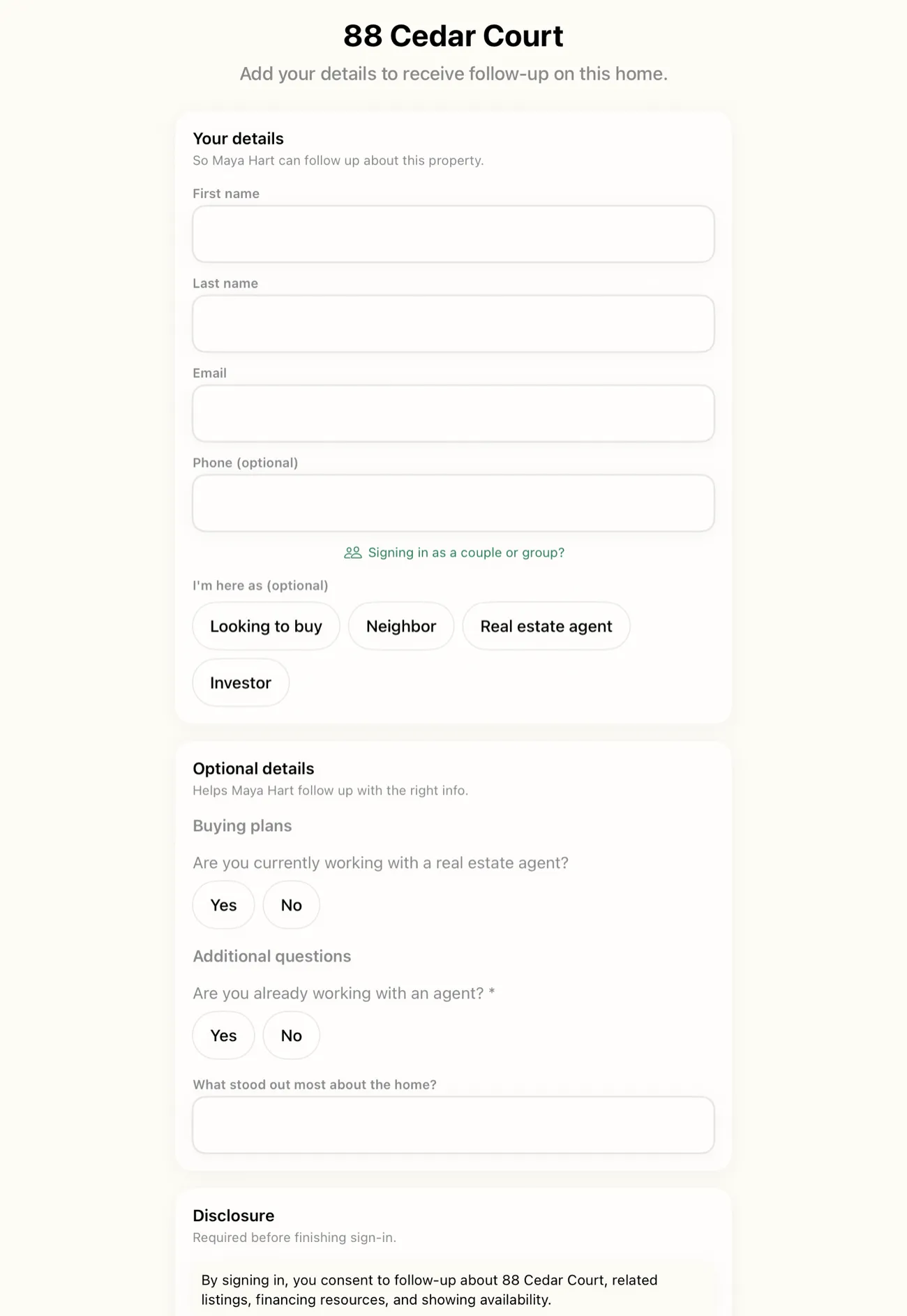
"Interested in this property?" beats "give us your data"
The last piece is framing, and it costs nothing. Most open house check-in apps present the digital open house sign in as a security formality or a data harvest. Please register. Fields marked * are required. Visitors aren't stupid. They know a form that asks about their mortgage status before their name is an extraction device, and they respond the way everyone responds to extraction devices: minimally and defensively.
OpenHouse flips the frame. The sign-in screen reads as the natural answer to a question the visitor already has: interested in this property? Signing in is how you get the follow-up. The disclosure packet, the "it went pending" text, the heads-up when the seller drops the price. That framing is honest, because it's literally what the data is for. NAR's research on how buyers actually find and pursue homes points at the same truth agents already know from door duty: serious buyers want a channel to the listing. A digital open house sign in should feel like opening that channel, not like a toll for walking through the door.
The form is the first interaction a buyer has with you as an agent. A single screen that respects their time says something about how you'll handle their transaction. A four-page interrogation says something too.
One screen, then everything else
The single-screen form is the front door of the whole OpenHouse workflow. Visitors finish the digital open house sign in within seconds, leads land on your device immediately, and from there you can qualify, export to CSV or your CRM, and hand the seller a traffic report. The full feature list covers what happens after the tap. But the order matters. None of the downstream features can recover a lead that quit on page two of a sign-in form. Completion comes first. That's why the form is one screen.
If you've been burned by handing a visitor a tablet and getting back a half-finished survey, run a digital open house sign in with OpenHouse at your next listing and count how many more visitors actually finish.
Keeping the line moving at a packed weekend open house
A Saturday afternoon listing in a hot zip code does not look like a Tuesday showing. You might get three visitors trickling through over two hours, or you might get twelve people walk in the first fifteen minutes, cluster in the entryway, and all look at you simultaneously. The busy open house sign in scenario is a different problem than a quiet midweek showing, and most sign-in tools are only designed for the quiet one.
The math is straightforward but agents rarely think through it explicitly. A form that takes forty-five seconds per visitor means four visitors per three minutes through the kiosk. A form that takes ten seconds means eighteen visitors in the same window. At a high-traffic open house, thirty visitors in two hours on a busy weekend, the difference in throughput is not marginal. It is the difference between capturing the whole room and capturing the people who were willing to wait while the couple ahead of them deliberated over the "are you working with an agent?" dropdown.
What compounds the problem at a packed weekend open house is the social dynamic at the door. Visitors who see a queue at the kiosk make a real-time decision: is this worth waiting for? Most of them decide it isn't. They smile, nod at the sign-in station, and walk past it. You notice it happening. You can't stop it without physically intercepting them, which creates a different awkward interaction. The slow form didn't just lose one lead, it signaled to everyone behind that visitor that the door tax was high, and several of them opted out silently.
Fast open house check in solves this before it starts. When the visitor ahead of them finishes in ten seconds and the screen resets immediately, the next person in doesn't see a queue. They see an empty kiosk and a fast handoff. The whole crowd moves through.
A few things to have in place on a high-traffic morning:
- Put the iPad on a stand before the first visitor arrives. iPad in hand is slower than iPad on kiosk, hand-to-hand transactions take longer and create uncertainty about whose turn it is.
- Let kiosk mode do the door-greeting. The welcome screen says what you'd say. You stay in the main room working the crowd. The door handles itself.
- Keep the kiosk in a spot where visitors can sign in without blocking the entry. If the kiosk forces a bottleneck at the threshold, even a ten-second form creates a backup.
The single-screen form matters precisely because the sign-in moment is brief. Weekend open house throughput is a function of how fast the iPad resets for the next person, and that is a direct output of how many fields stand between a visitor and the "done" button.
If you're running back-to-back showings at multiple properties on the same weekend, the per-event logistics get more complex, see the guide on running multiple open houses for how to handle device handoffs, separate lead lists, and seller reports across events. The throughput principles here apply to each individual event; that guide covers the multi-event layer on top.
Throughput at the door: not bottlenecking your busiest listing
There is a particular failure mode at a high-traffic open house that agents don't talk about enough, because it's invisible in the data. You look at your sign-in sheet at the end of the day and see twenty-two names. You feel good about that. What you don't see is the six visitors who came in, glanced at the backed-up kiosk, and kept walking to the kitchen. Those leads are not in your export. They were never captured. They don't show up as abandoned sign-ins, because they never started one. The door bottleneck is a silent drain.
The fix is not a faster agent or a bigger tablet, it is a shorter form. A busy open house sign in with one screen and four fields is the only structural change that reliably raises the number of completed sign-ins at a crowded listing. Everything else is managing the symptom.
Consider what "not bottlenecking the door" actually requires in practice. The visitor should be able to pick up the task from zero context, no one explained how the form works, complete it, and put the device back. All without needing to ask you a question, navigate to a second screen, or make a decision about which fields are required. That is a usability standard, not just a speed standard. A form that confuses a visitor for fifteen seconds is worse than a form that takes fifteen seconds to type through, because confusion creates hesitation at the door rather than steady throughput.
OpenHouse's single screen handles this by removing every decision that doesn't need to exist. There is no account to log in to. There is no page two. The "done" button is visible from the moment the visitor picks up the iPad. The fields are labeled plainly. The keyboard that appears matches the field (number pad for phone, email keyboard for email). None of those details are flashy, but each one removes a half-second of friction, and at a fast open house check in station running back-to-back visitors, those half-seconds add up to a real lead captured or missed.
After the event, the data is already on the device. No sync required, no waiting for a cloud to catch up. You can pull the export on the drive home and have the follow-up list ready before Sunday dinner. The agent across town who was running a multi-page sign-in form at their listing is still trying to figure out why seventeen of their "completed" sign-ins have bounced emails.
Frequently asked questions
What fields should a digital open house sign-in form include?
Four required fields earn their place on the first screen: first name, last name, email, and phone. Everything else, timeline, agent status, financing, belongs below the fold as optional, because each extra required field costs you completed sign-ins.
What happens if a visitor only wants to give a phone number?
OpenHouse accepts phone-only sign-ins. A visitor who skips the email field still saves as a complete, contactable lead, because a real phone number is worth more than a fake email typed to get past a required field.
Can I add my own qualifying questions to the sign-in form?
Yes, but they stay optional and sit below the four core fields. Visitors who are happy to share their timeline or agent status can, and visitors in a hurry can still finish in seconds.
How long should an open house sign-in take?
About ten seconds. If a visitor is still holding the iPad after that, the form is too long, they start glancing at the door, and the next visitor walks past the kiosk entirely.
Does the sign-in screen work without Wi-Fi?
Yes. Every sign-in is written to local storage on the device the moment a visitor taps done. There is no network call, no sync step, and no spinner between the visitor and the saved lead.
How does a fast sign-in help at a busy open house?
At a high-traffic open house, a slow form creates a physical line at the door. Visitors who see a queue often skip the kiosk entirely. A ten-second sign-in means the iPad is free before the next visitor finishes walking in, so you capture the whole crowd rather than only the patient ones.
What is the biggest reason visitors abandon a sign-in at a packed open house?
The form is still running when the social moment has passed. The greeting ends, an awkward pause opens, and the visitor hands the iPad back half-done. A single-screen form closes before that pause starts.
Does throughput at the door actually affect how many leads I capture?
Yes. At a 30-visitor weekend open house, a form that takes 45 seconds instead of 10 seconds can back up the door and push later arrivals past the kiosk. The same listing, same crowd, same agent, faster check-in produces more completed sign-ins.